
Introduction: Why “Reliable Publishing” is Hard
The Outbox Pattern in .NET is one of the most practical solutions to a problem every distributed system eventually hits: you save data to your database, publish an event to your message broker, and move on — until a crash or a network hiccup leaves your system in an inconsistent state.
Saving data and publishing a message are two separate operations. When your process exits after committing to the database but before publishing the event, that message is gone — no exception, no log, no trace. Your data says the order exists; your downstream services have no idea.
The core issue is simple:
There is no atomic transaction that spans both your database and your message broker.
In this post, we’ll implement the Outbox Pattern in .NET 10 from scratch using EF Core and PostgreSQL, with RabbitMQ and MassTransit handling message delivery. By the end, you’ll have a production-ready foundation you can drop into any event-driven service.
How the Outbox Pattern Works
The core idea is deceptively simple: instead of publishing a message directly to a broker, your application writes it to an OutboxMessages table in the same database transaction as your business data. A separate background process — the dispatcher — reads unprocessed rows from that table and publishes them to the broker. Once published, the row is marked as processed.
That’s it. Two phases, one guarantee: either both your business record and the outbox entry are committed, or neither is.
Separating Two Concerns
The pattern draws a clean boundary between two responsibilities that developers often treat as one:
Business transaction — the application’s job. It saves the domain state and appends an outbox record atomically. It doesn’t care about brokers, retries, or network conditions. If the database commit succeeds, its job is done.
Message delivery — the dispatcher’s job. It reads from the outbox, publishes to the broker, and marks records as processed. It runs independently, can retry safely, and can be scaled or replaced without touching business logic.
This separation means a broker outage has zero impact on your application’s ability to accept and persist work. Messages queue up in the outbox and are delivered as soon as the broker recovers.
The Delivery Guarantee
Because the dispatcher may crash between publishing and marking a record processed, the same message can be published more than once. This is a known trade-off: the Outbox Pattern guarantees at-least-once delivery, not exactly-once. Your consumers should be idempotent — processing the same message twice should produce the same result as processing it once.
The Two-Phase Flow
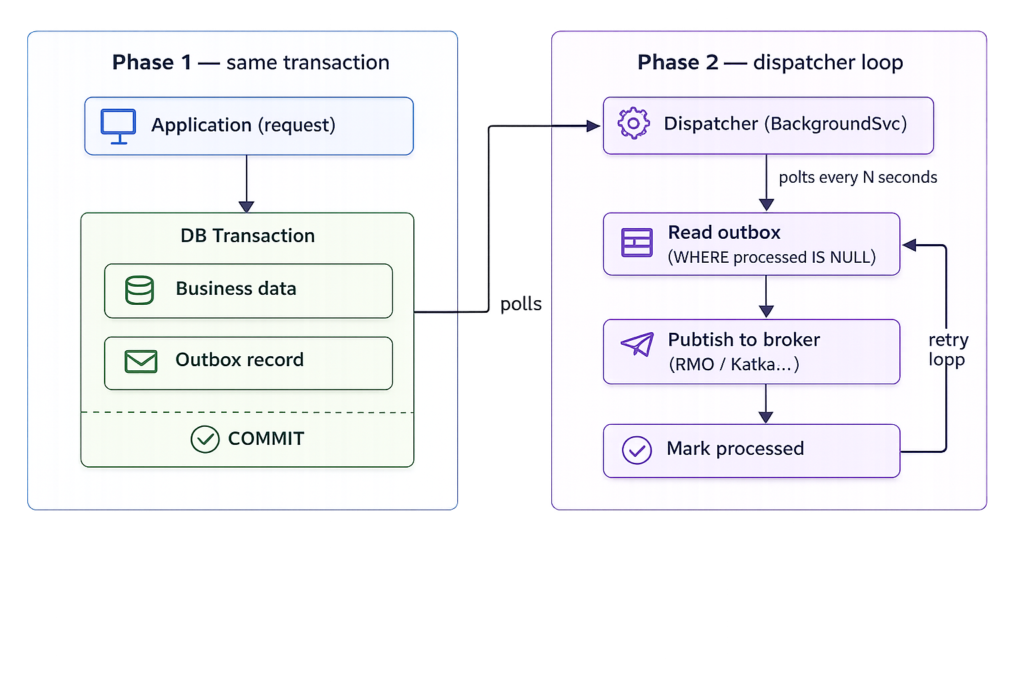
The retry loop is intentional — if the dispatcher crashes after publishing but before marking the record processed, it will re-read and republish the same message on the next poll cycle. This is exactly what produces at-least-once semantics. The outbox row acts as a durable checkpoint.
Implementation Outbox Pattern in .NET
To put everything we’ve covered into practice, we’ll build a working .NET 10 project that implements the Outbox Pattern from scratch. The database is PostgreSQL, running locally via Docker — no cloud setup required, just a docker compose up and you’re ready to go. For messaging, we’ll use RabbitMQ as the broker and MassTransit as the abstraction layer on top of it, also running locally via Docker.
The project we’ll build is a Parcel Tracking API. When a parcel is created, the application saves it to the database and queues a ParcelCreatedEvent in the outbox — all in a single transaction. A background dispatcher then picks up the event and publishes it to RabbitMQ via MassTransit. It’s a focused domain with a clear, real-world reason to care about reliable message delivery: a lost event means a customer never gets notified about their shipment.
Let’s build it!
Setup
First, create a docker-compose.yaml file to spin up the database and message broker. This is for local development only — not intended for production use.
services:
  db:
    image: postgres:16
    restart: always
    environment:
      POSTGRES_USER: admin
      POSTGRES_PASSWORD: admin
      POSTGRES_DB: demodb
    ports:
      - "5432:5432"
    volumes:
      - postgres_data:/var/lib/postgresql

  rabbitmq:
    image: rabbitmq:3-management
    container_name: rabbitmq
    restart: always
    environment:
      RABBITMQ_DEFAULT_USER: guest
      RABBITMQ_DEFAULT_PASS: guest
    ports:
      - "5672:5672"    # RabbitMQ messaging port
      - "15672:15672"  # Management UI — http://localhost:15672

volumes:
  postgres_data:
Next, create the solution with the following structure:
ParcelTracker/
├── docker-compose.yaml
└── src/
    ├── ParcelTracker.Api/
    │   ├── Program.cs
    │   └── Endpoints/
    │       └── ParcelEndpoints.cs
    ├── ParcelTracker.Domain/
    │   ├── Parcel.cs
    │   └── Events/
    │       └── ParcelCreatedEvent.cs
    ├── ParcelTracker.Infrastructure/
    │   ├── AppDbContext.cs
    │   ├── OutboxMessage.cs
    │   ├── Messaging/
    │   │   ├── IMessagePublisher.cs
    │   │   └── MassTransitMessagePublisher.cs
    │   ├── Configurations/
    │   │   └── OutboxMessageConfiguration.cs
    │   └── Migrations/
    └── ParcelTracker.Worker/
        └── OutboxProcessor.cs
A note on project hosting: the
A note on project hosting: the OutboxProcessor background service runs inside ParcelTracker.Worker, which is a separate .NET Worker Service project. It shares the Infrastructure layer with the API but runs as its own process — giving you the flexibility to scale the dispatcher independently from the HTTP API.
Database Migrations
Before writing any application code, we need to create the database schema.
Since we’re using EF Core, we’ll let migrations handle that rather than writing SQL by hand.
First, make sure you have the EF Core tools installed:
dotnet tool install --global dotnet-ef
Next, add a ParcelConfiguration class in Infrastructure/Configurations/ so
EF Core knows how to map the Parcel entity to the database:
internal sealed class ParcelConfiguration : IEntityTypeConfiguration<Parcel>
{
    public void Configure(EntityTypeBuilder<Parcel> builder)
    {
        builder.ToTable("parcels");

        builder.HasKey(x => x.Id);

        builder.Property(x => x.Id)
            .HasColumnName("id");

        builder.Property(x => x.TrackingNumber)
            .HasColumnName("tracking_number")
            .IsRequired();

        builder.Property(x => x.Destination)
            .HasColumnName("destination")
            .IsRequired();

        builder.Property(x => x.CreatedAt)
            .HasColumnName("created_at")
            .IsRequired();
    }
}
ApplyConfigurationsFromAssembly in your AppDbContext picks this up automatically alongside OutboxMessageConfiguration — no extra registration needed.
The Domain Model
The domain layer is intentionally small. It has one job: model what a parcel is and what happens when one is created — nothing else. No database concerns, no messaging, no HTTP.
ParcelCreatedEvent
public sealed record ParcelCreatedEvent(
    Guid ParcelId,
    string TrackingNumber,
    string Destination,
    DateTime CreatedAt);
A record is the right choice here — domain events are immutable by nature. Once something happened, the record of it shouldn’t change. The sealed modifier is intentional too; domain events aren’t designed to be inherited.
Parcel
public sealed class Parcel
{
    public Guid Id { get; private set; }
    public string TrackingNumber { get; private set; } = string.Empty;
    public string Destination { get; private set; } = string.Empty;
    public DateTime CreatedAt { get; private set; }

    private Parcel() { }

    public static (Parcel parcel, ParcelCreatedEvent parcelCreatedEvent) Create(
        string trackingNumber, string destination)
    {
        if (string.IsNullOrWhiteSpace(trackingNumber))
            throw new ArgumentException(
                "Tracking number cannot be null or empty.", nameof(trackingNumber));

        if (string.IsNullOrWhiteSpace(destination))
            throw new ArgumentException(
                "Destination cannot be null or empty.", nameof(destination));

        var parcelId  = Guid.NewGuid();
        var createdAt = DateTime.UtcNow;

        var parcelCreatedEvent = new ParcelCreatedEvent(
            ParcelId:       parcelId,
            TrackingNumber: trackingNumber,
            Destination:    destination,
            CreatedAt:      createdAt);

        var parcel = new Parcel
        {
            Id             = parcelId,
            TrackingNumber = trackingNumber,
            Destination    = destination,
            CreatedAt      = createdAt
        };

        return (parcel, parcelCreatedEvent);
    }
}
A few deliberate decisions worth noting:
The private constructor prevents direct instantiation. You can’t do new Parcel() from outside the class. The only way to get a valid Parcel is through Create(), which guarantees the object is always fully initialized and validated.
Create() returns both the aggregate and the event together. The parcel and the ParcelCreatedEvent share the same Id and CreatedAt — created at the same instant from the same values. Returning them as a tuple keeps that relationship explicit and makes it impossible for the caller to accidentally use mismatched data.
Validation lives in the domain, not the endpoint. This means the rule “a parcel must have a tracking number” is enforced regardless of how Create() is called — HTTP request, test, background job, it doesn’t matter.
The OutboxMessage Schema
Every outbox implementation lives or dies on its schema. You need enough information to: identify the message, deserialize it into the right type, know when it was created, and know whether it has been processed.
Here’s the table:
CREATE TABLE outbox_messages (
    id            UUID         NOT NULL DEFAULT gen_random_uuid(),
    occurred_on   TIMESTAMPTZ  NOT NULL,
    type          TEXT         NOT NULL,
    payload       JSONB        NOT NULL,
    processed_on  TIMESTAMPTZ  NULL,
    retry_count   INT          NOT NULL DEFAULT 0,

    CONSTRAINT pk_outbox_messages PRIMARY KEY (id)
);

CREATE INDEX ix_outbox_messages_unprocessed
    ON outbox_messages (occurred_on)
    WHERE processed_on IS NULL;
A few deliberate decisions worth calling out:
type stores the fully-qualified .NET type name. The dispatcher needs to know what to deserialize payload into before it can publish the right message contract. Storing typeof(ParcelCreatedEvent).AssemblyQualifiedName makes deserialization deterministic.
payload is JSONB, not TEXT. PostgreSQL can index and query inside JSONB columns. You probably won’t need that for a basic outbox, but it costs nothing and makes debugging easier — you can query the column directly in psql without stripping escape characters.
The partial index on processed_on IS NULL is the most important index in this table. Your dispatcher will poll this condition in a tight loop. Without it, every poll is a full table scan as the outbox grows.
processed_on is nullable, not a boolean. A timestamp tells you when the message was delivered, which is invaluable for debugging latency and auditing. A boolean tells you nothing.
retry_count is included from the start. You’ll need it for poison message handling in production. Better to have it in the schema upfront than to add a migration under pressure.
The EF Core Model
OutboxMessage entity
public sealed class OutboxMessage
{
    public Guid Id { get; private set; }
    public DateTime OccurredOn { get; private set; }
    public string Type { get; private set; } = string.Empty;
    public string Payload { get; private set; } = string.Empty;
    public DateTime? ProcessedOn { get; private set; }
    public int RetryCount { get; private set; }

    private OutboxMessage() { }

    public static OutboxMessage From<T>(T domainEvent) where T : class
    {
        if (domainEvent is null)
            throw new ArgumentNullException(nameof(domainEvent));

        var payload = JsonSerializer.Serialize(domainEvent, domainEvent.GetType());
        var type    = domainEvent.GetType().AssemblyQualifiedName
                      ?? throw new InvalidOperationException(
                             "Unable to determine the type of the domain event.");

        return new OutboxMessage
        {
            Id         = Guid.NewGuid(),
            OccurredOn = DateTime.UtcNow,
            Type       = type,
            Payload    = payload
        };
    }

    public void MarkAsProcessed() => ProcessedOn = DateTime.UtcNow;
    public void MarkFailed()      => RetryCount++;
}
The private constructor and static factory keep the entity valid by construction — you can never create an OutboxMessage with a null payload or missing type. MarkFailed() is used by the dispatcher when a publish attempt fails, incrementing the retry counter so the row can eventually be quarantined as a poison message.
EF Core configuration
With the entity in place, we need to tell EF Core how to map it to the database. Rather than relying on conventions — which would get the column names and types wrong — we’ll use an explicit IEntityTypeConfiguration. This is where we pin the jsonb column type for the payload and register the partial index that makes the dispatcher query fast.
internal sealed class OutboxMessageConfiguration : IEntityTypeConfiguration<OutboxMessage>
{
    public void Configure(EntityTypeBuilder<OutboxMessage> builder)
    {
        builder.ToTable("outbox_messages");

        builder.HasKey(x => x.Id);

        builder.Property(x => x.Id)
            .HasColumnName("id")
            .ValueGeneratedOnAdd();

        builder.Property(x => x.OccurredOn)
            .HasColumnName("occurred_on")
            .IsRequired();

        builder.Property(x => x.Type)
            .HasColumnName("type")
            .IsRequired();

        builder.Property(x => x.Payload)
            .HasColumnName("payload")
            .HasColumnType("jsonb")
            .IsRequired();

        builder.Property(x => x.ProcessedOn)
            .HasColumnName("processed_on")
            .IsRequired(false);

        builder.Property(x => x.RetryCount)
            .HasColumnName("retry_count")
            .IsRequired();

        builder.HasIndex(x => x.OccurredOn)
            .HasFilter("processed_on IS NULL")
            .HasDatabaseName("ix_outbox_messages_unprocessed");
    }
}
AppDbContext
The last piece of the infrastructure setup is the AppDbContext. Nothing special here — we add OutboxMessages as a DbSet alongside Parcels, and let ApplyConfigurationsFromAssembly pick up the configuration class we just wrote automatically.
public class AppDbContext : DbContext
{
    public AppDbContext(DbContextOptions<AppDbContext> options) : base(options) { }

    public DbSet<Parcel> Parcels => Set<Parcel>();
    public DbSet<OutboxMessage> OutboxMessages => Set<OutboxMessage>();

    protected override void OnModelCreating(ModelBuilder modelBuilder)
    {
        modelBuilder.ApplyConfigurationsFromAssembly(typeof(AppDbContext).Assembly);
    }
}
The key thing to note: OutboxMessages sits in the same context as your business data. That’s not incidental — it’s what makes the single-transaction write possible. If you split them into separate contexts, you lose the atomicity guarantee the whole pattern depends on.
The API Endpoint
With the domain model in place, the endpoint is straightforward. Its only responsibilities are: call the domain, write to the database, return a response.
var endpoints = app.MapGroup("api/parcels")
    .AllowAnonymous();

endpoints.MapPost("", AddNewParcelTrackingAsync);

async Task<IResult> AddNewParcelTrackingAsync(
    [FromBody] ParcelDto parcelDto,
    AppDbContext appDbContext)
{
    // 1. Domain creates the parcel and the event together
    var (parcel, parcelCreatedEvent) = Parcel.Create(
        parcelDto.TrackingNumber,
        parcelDto.Destination);

    // 2. Persist the parcel
    appDbContext.Parcels.Add(parcel);

    // 3. Append the outbox record — same unit of work
    appDbContext.OutboxMessages.Add(OutboxMessage.From(parcelCreatedEvent));

    // 4. Single SaveChangesAsync = single DB transaction
    await appDbContext.SaveChangesAsync();

    return Results.Ok();
}
Step 3 is where the Outbox Pattern actually happens — and it’s easy to miss how little ceremony it requires. OutboxMessage.From(parcelCreatedEvent) serializes the domain event into an outbox row, and because it’s added to the same AppDbContext before SaveChangesAsync is called, both rows land in the database in a single transaction.
There is no try/catch around a publish call. There is no broker involved here at all. The endpoint’s job ends at SaveChangesAsync — if that succeeds, the message will be delivered. The dispatcher handles everything from here.
This is the separation of concerns the pattern enforces in practice: the endpoint owns the write, the dispatcher owns the delivery.
The OutboxProcessor Background Service
The dispatcher is a .NET BackgroundService running in the Worker project. It wakes up on a configurable interval, finds unprocessed outbox rows, publishes them to the broker, and marks them done.
IMessagePublisher
Before writing the processor, define a thin abstraction over the broker. This lives in Infrastructure/Messaging/ and is what keeps the outbox broker-agnostic:
// Infrastructure/Messaging/IMessagePublisher.cs
public interface IMessagePublisher
{
    Task PublishAsync(string messageType, string payload, CancellationToken ct);
}
The MassTransit implementation sits right next to it:
// Infrastructure/Messaging/MassTransitMessagePublisher.cs
public sealed class MassTransitMessagePublisher : IMessagePublisher
{
    private readonly IPublishEndpoint _publishEndpoint;

    public MassTransitMessagePublisher(IPublishEndpoint publishEndpoint)
        => _publishEndpoint = publishEndpoint;

    public async Task PublishAsync(string messageType, string payload, CancellationToken ct)
    {
        var type = Type.GetType(messageType)
                   ?? throw new InvalidOperationException(
                          $"Cannot resolve type '{messageType}'.");

        var message = JsonSerializer.Deserialize(payload, type)
                      ?? throw new InvalidOperationException(
                             $"Cannot deserialize payload for type '{messageType}'.");

        await _publishEndpoint.Publish(message, type, ct);
    }
}
Swap this implementation for a raw Kafka producer or any other broker without touching the processor.
OutboxProcessor
public sealed class OutboxProcessor : BackgroundService
{
    private readonly IServiceScopeFactory _scopeFactory;
    private readonly ILogger<OutboxProcessor> _logger;
    private readonly TimeSpan _pollingInterval = TimeSpan.FromSeconds(5);

    public OutboxProcessor(
        IServiceScopeFactory scopeFactory,
        ILogger<OutboxProcessor> logger)
    {
        _scopeFactory = scopeFactory ?? throw new ArgumentNullException(nameof(scopeFactory));
        _logger       = logger       ?? throw new ArgumentNullException(nameof(logger));
    }

    protected override async Task ExecuteAsync(CancellationToken stoppingToken)
    {
        while (!stoppingToken.IsCancellationRequested)
        {
            try
            {
                await ProcessPendingMessagesAsync(stoppingToken);
            }
            catch (Exception ex)
            {
                _logger.LogError(ex, "Outbox processor encountered an error.");
            }

            await Task.Delay(_pollingInterval, stoppingToken);
        }
    }

    private async Task ProcessPendingMessagesAsync(CancellationToken ct)
    {
        using var scope = _scopeFactory.CreateScope();

        // Both resolved from the scope — neither is injected into the constructor.
        // OutboxProcessor is a singleton (BackgroundService); AppDbContext and
        // IMessagePublisher are scoped. Resolving from a fresh scope per cycle
        // avoids the captive dependency bug.
        var db        = scope.ServiceProvider.GetRequiredService<AppDbContext>();
        var publisher = scope.ServiceProvider.GetRequiredService<IMessagePublisher>();

        var messages = await db.OutboxMessages
            .FromSqlRaw("""
                SELECT * FROM outbox_messages
                WHERE processed_on IS NULL
                AND retry_count < 5
                ORDER BY occurred_on
                LIMIT 20
                FOR UPDATE SKIP LOCKED
                """)
            .ToListAsync(ct);

        foreach (var message in messages)
        {
            try
            {
                await publisher.PublishAsync(message.Type, message.Payload, ct);
                message.MarkAsProcessed();

                _logger.LogInformation(
                    "Published outbox message {Id} [{Type}].",
                    message.Id, message.Type);
            }
            catch (Exception ex)
            {
                _logger.LogWarning(ex,
                    "Failed to publish outbox message {Id}. Retry {Count}.",
                    message.Id, message.RetryCount + 1);

                message.MarkFailed();
            }

            await db.SaveChangesAsync(ct);
        }
    }
}
A few deliberate decisions worth noting:
IServiceScopeFactory instead of injecting AppDbContext or IMessagePublisher directly. BackgroundService is a singleton. Both AppDbContext and IMessagePublisher (which depends on MassTransit’s scoped IPublishEndpoint) are scoped services. Injecting a scoped service into a singleton is a captive dependency — it causes stale state and concurrency bugs that are hard to diagnose. Creating a fresh scope per polling cycle is the correct pattern.
FOR UPDATE SKIP LOCKED ensures that when multiple dispatcher instances run simultaneously, each instance claims an exclusive, non-overlapping batch. Rows locked by another instance are skipped entirely rather than blocking the query.
Take(20) — process in small batches. Under load, a backlog could grow to thousands of rows. Batching keeps memory pressure predictable and lets you tune throughput independently of the polling interval.
SaveChangesAsync per message, not per batch. If you batch the MarkAsProcessed calls and the process crashes halfway through, every message in that batch gets republished on the next cycle. Marking each message immediately after publishing minimises the duplicate window.
Registration
// Worker Program.cs
builder.Services.AddHostedService<OutboxProcessor>();
builder.Services.AddScoped<IMessagePublisher, MassTransitMessagePublisher>();
IMessagePublisher must be registered as Scoped, not Singleton. MassTransit’s IPublishEndpoint is scoped, so its consumer must be scoped too. Registering as a singleton causes a startup exception: Cannot consume scoped service from singleton.
Production Considerations
The implementation above works correctly. Before shipping it, a few things are worth hardening.
Concurrent Dispatcher Instances
The FOR UPDATE SKIP LOCKED query in the processor already handles this — each instance claims an exclusive batch that no other instance can touch. This is active in the implementation above and requires no additional work.
Poison Messages
A poison message is an outbox row that consistently fails to publish — a bad payload, an unresolvable type, a broker schema mismatch. The retry_count < 5 filter in the query ensures the dispatcher stops retrying after five failures. The row stays in the table with processed_on IS NULL and retry_count >= 5, visible for inspection but no longer blocking forward progress.
Wire up an alert on the dead message count — any value above zero deserves attention:
SELECT COUNT(*) FROM outbox_messages
WHERE processed_on IS NULL
AND retry_count >= 5;
Cleaning Up Processed Rows
Processed rows accumulate fast. Add a cleanup job that runs on a schedule:
public sealed class OutboxCleanupJob
{
    private readonly AppDbContext _db;

    public OutboxCleanupJob(AppDbContext db) => _db = db;

    public async Task RunAsync(CancellationToken ct)
    {
        var cutoff = DateTime.UtcNow.AddDays(-7);

        await _db.OutboxMessages
            .Where(m => m.ProcessedOn != null && m.ProcessedOn < cutoff)
            .ExecuteDeleteAsync(ct);
    }
}
Seven days gives you enough history for debugging while keeping the table lean. Register this as a second BackgroundService with a 24-hour interval, or drive it from Hangfire or Quartz.NET if you already have a scheduler in your stack.
Observability
Two metrics give you an early warning system before users notice missing events:
Outbox lag — the age of the oldest unprocessed message. If this grows beyond your polling interval, something is wrong:
var oldestUnprocessed = await db.OutboxMessages
    .Where(m => m.ProcessedOn == null && m.RetryCount < 5)
    .MinAsync(m => (DateTime?)m.OccurredOn, ct);

if (oldestUnprocessed is not null)
{
    var lagSeconds = (DateTime.UtcNow - oldestUnprocessed.Value).TotalSeconds;
    _metrics.RecordOutboxLag(lagSeconds);
}
Dead message count — the number of rows with retry_count >= 5. Any value above zero should trigger an alert.
These two signals tell you: is the outbox keeping up, and are there messages it has given up on?
Conclusion
The Outbox Pattern is one of those solutions that feels almost too simple once you understand it. You’re not introducing a new infrastructure component, a distributed coordinator, or a saga framework. You’re writing to two tables in the same transaction — something your database has been able to do reliably for decades.
But that simplicity is precisely the point. The complexity of distributed messaging doesn’t disappear; it gets pushed to a place that can handle it: a background process that retries safely, runs independently, and doesn’t block your application from doing its job.
What you get
By implementing what we’ve built in this post, your system gains:
- Transactional durability — a message is only queued for delivery if the business data was committed. No phantom events, no missing events.
- At-least-once delivery — the dispatcher retries until the broker acknowledges. Combined with idempotent consumers, this is a production-grade guarantee.
- Broker independence — swapping RabbitMQ for Kafka, or MassTransit for a raw producer, requires changing one class behind
IMessagePublisher. Nothing else moves. - Operational visibility — unprocessed rows, retry counts, and lag metrics give you a clear picture of system health at all times.
Outbox Pattern vs. Change Data Capture
The polling outbox is the right default for most teams. It’s self-contained, requires no additional infrastructure, and is straightforward to reason about.
Change Data Capture (CDC) — tools like Debezium reading PostgreSQL’s WAL — is the right choice when you need sub-second latency, want to decouple the dispatcher entirely from your application process, or are dealing with very high throughput where polling at scale becomes inefficient. CDC is more powerful but operationally more complex. Start with the polling outbox. Migrate to CDC if you hit its limits — and you may never need to.
Where to go from here
LISTEN/NOTIFY— replace the polling loop with a PostgreSQL notification trigger for near-instant dispatch without the latency floor- MassTransit’s native outbox —
UseInboxOutbox()gives you a battle-tested outbox implementation with minimal configuration if you want a framework-managed alternative
Cover Image by LuAnn Hunt from Pixabay
5 thoughts on “Outbox Pattern in .NET: How to Implement Reliable Message Publishing”
Good detailed write up. Is guaranteed ordering a concern? I see guaranteed delivery but when scaling the outbox host horizontally is there a risk of getting messages out of order into the destination stream?
Good catch, Luis. Short answer: the Outbox Pattern guarantees delivery, not ordering — those are separable concerns.
Within a single dispatcher instance, `ORDER BY occurred_on` gives you best-effort FIFO. Scale horizontally and that breaks — two instances claim independent batches via `SKIP LOCKED`, so publish order is no longer deterministic.
The most pragmatic fix is to make it a consumer concern: include a sequence number or event version on the message and let consumers reorder on their end. That’s also where idempotency comes in.
I use Sequential GUID.
Reliable message publishing is one of those topics that matters more in production than in architecture diagrams. This outbox pattern write-up made the issue here: https://dotnetnews.co/archive/the-net-news-daily-issue-487/